
Browser agents & semantic markup — SEO Grid automation
SEO Grid is designed so browser agents (Gemini, ChatGPT browse, Playwright, etc.) can help merchants edit SEO one row at a time, or review highlighted rows before the merchant clicks Save All.
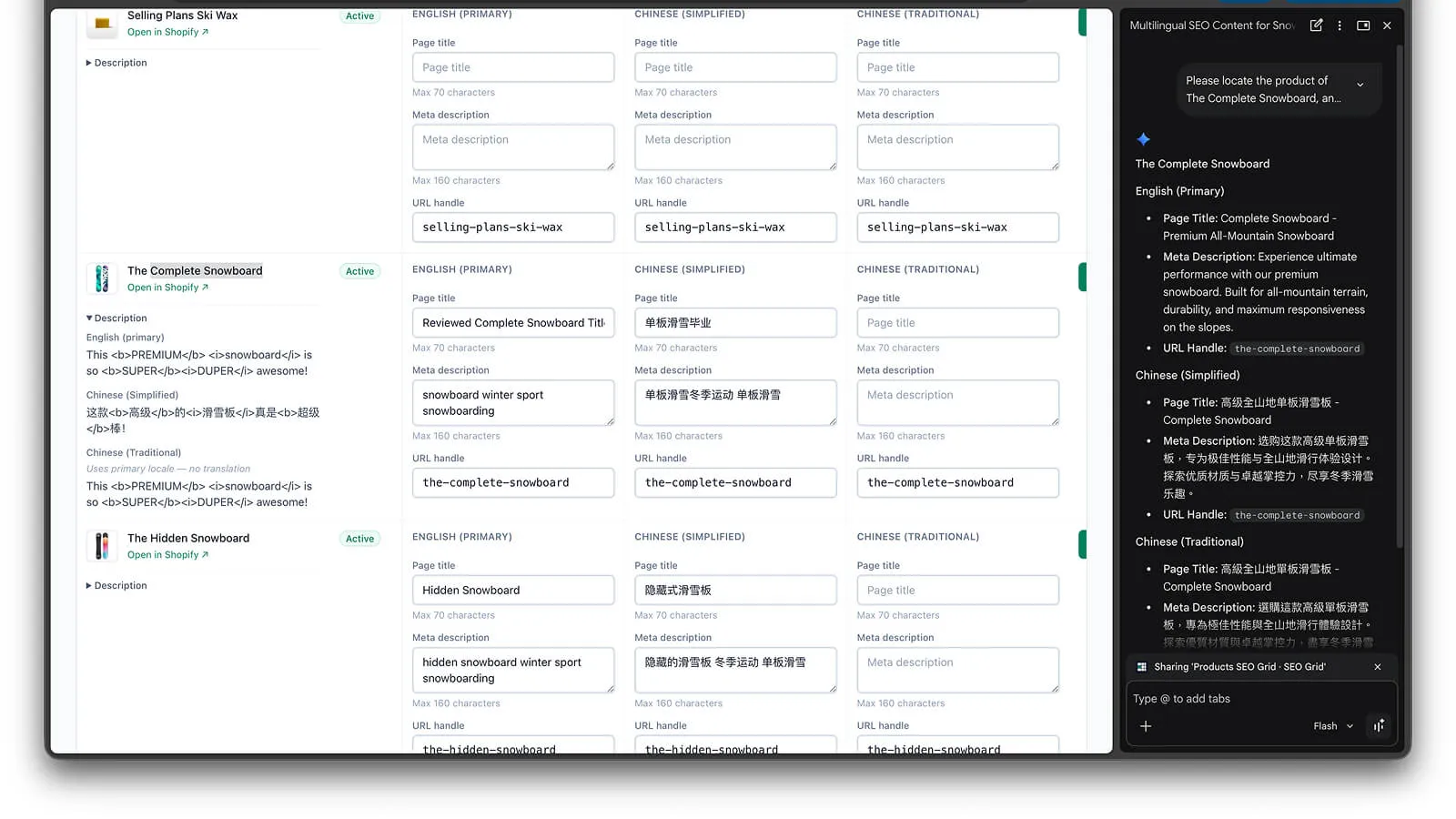
Page structure
Section titled “Page structure”| Feature | Purpose |
|---|---|
<main data-seo-grid> | Root grid landmark for agents |
Row data-* attributes | Stable field names per cell |
JSON-LD WebApplication | Machine-readable app + shop context in <head> |
| Collapsible Guide footer | Human-readable steps (#seo-grid-guide) |
| Row info panels | Optional context with ?context=description (or other field keys) |
| Status filter | ?status=draft / published / archived / unlisted on products, pages, articles; <meta name="seo-grid:status-filter"> when active |
| Tag filter (products) | ?tag= exact product tag; <meta name="seo-grid:tag-filter"> when active |
| CSV / JSON transfer | Header CSV / JSON buttons — export current page or import edited SEO back into grid inputs |
| Save All | Pagination bar Save All (N) — saves highlighted rows on this page after merchant confirms (agents should not click without explicit OK) |
| Dirty rows | data-grid-dirty="true" on <tr> when SEO inputs differ from last saved value |
Rules for agents
Section titled “Rules for agents”- Save one row — click that row’s Save control after editing; never click Save All unless the merchant explicitly asks.
- Dirty rows — after import Apply or manual edits, rows with
data-grid-dirty="true"still need Save or Save All before Shopify updates. - Confirm shop — check
data-app-shopin the header matches the intended store. - Respect locales — edit cells under the correct locale column before saving.
- Read Row info when unsure which product or page a row represents.
Example prompts for merchants
Section titled “Example prompts for merchants”Copy these into your browser assistant while SEO Grid is open (Products, Pages, or Blog posts). Expand How to use SEO Grid in the app footer if the agent needs vocabulary. Agents read [data-seo-grid], row data-* attributes, and <meta name="seo-grid:*"> tags — they do not save unless you ask them to click Save on one row.
Before you start: confirm the header shop name matches your store. For product suggestions, enable Row info (Description, Tags) and Apply.
Orient the agent
Section titled “Orient the agent”You are on SEO Grid, a Shopify admin app for editing search engine listing fields. Read the table with [data-seo-grid], the seo-grid meta tags in the page head, and the guide in #seo-grid-guide. Rules: edit one row at a time and click that row’s Save after changes — do not click Save All unless I ask. Rows with data-grid-dirty="true" are unsaved. Report the shop name, content type, and locales shown before doing anything else.Multi-locale audit setup
Section titled “Multi-locale audit setup”In Locales in grid, enable our primary locale plus [e.g. Chinese (Traditional) and Chinese (Simplified)], then Apply locales. List every locale code on the SEO inputs (data-locale). I will ask follow-up questions about missing translations.Which locales are missing translated SEO?
Section titled “Which locales are missing translated SEO?”Scan all visible rows in [data-seo-grid]. For each locale column (data-locale), check data-field="seo_title" and data-field="seo_description". List rows where a secondary locale has empty SEO title or meta description, or where secondary title/description is identical to primary (likely not translated yet). Do not flag matching URL handles — shared handles are normal. Group by locale code with resource title and data-resource-id.How many items have not started SEO optimization?
Section titled “How many items have not started SEO optimization?”Count rows where primary-locale data-field="seo_title" and data-field="seo_description" are both empty or whitespace. Also list rows where only one of those fields is filled. Give totals and the first 10 examples with resource title and data-status.Per-locale completion (this page)
Section titled “Per-locale completion (this page)”For each locale column currently shown, count rows with a non-empty SEO title and non-empty meta description. Present a small table: locale code → title filled / description filled / row count on this page. Highlight the weakest locale for SEO copy (ignore URL handles).Draft items with no SEO yet
Section titled “Draft items with no SEO yet”Focus on rows with draft or unpublished status. How many have empty primary-locale SEO title and description? List them with title and status.Products tagged but missing SEO
Section titled “Products tagged but missing SEO”I will set Tag to [your-tag] and click Search. Then list matching products where primary-locale SEO title or description is empty. Use Row info description and tags when suggesting angles. Do not save.Suggest SEO for one product (do not save)
Section titled “Suggest SEO for one product (do not save)”For the row with title [exact product name], read Row info if visible. Propose: (1) SEO page title ≤70 characters, (2) meta description ≤160 characters, (3) URL handle if it should change. Explain briefly. Do not click Save — show copy only.Translate SEO into another locale
Section titled “Translate SEO into another locale”For row [title], using primary-locale seo_title and seo_description as source, suggest natural [locale name] translations for the column with data-locale="[code]". Keep brand names unchanged. Optionally suggest a locale-specific URL handle only if it would help — same handle as primary is fine. Do not save until I confirm.Find work with filters
Section titled “Find work with filters”Tell me how to filter this grid with URL params: draft only (?status=draft), search by title (?q=), and on products exact tag (?tag=). Then list rows on the current page that still need primary-locale meta descriptions.Single-row edit (with confirmation)
Section titled “Single-row edit (with confirmation)”For [product or page title] only: propose primary-locale SEO title and meta description within character limits. Show the exact text you will enter in data-field="seo_title" and data-field="seo_description" before clicking Save. Wait for my OK, then edit that row and click Save once. Stop after one row.Limits to remember: search (?q=) matches primary-locale item title or SEO page title only; product tag filter (?tag=) is exact tag; agents must not click Save All without explicit merchant OK; Save All only covers dirty rows on the current page; Shopify Admin may need a refresh after save.
Bulk SEO draft via export / import
Section titled “Bulk SEO draft via export / import”Export this page as JSON (CSV / JSON button → Export → Download). Rewrite only seo_title and seo_description for each row in the file — keep schemaVersion, grid metadata, resource_id, and context fields unchanged. Return the full JSON. I will paste it into Import → Validate → Apply, then Save All or Save rows myself.Merchant guide in the app
Section titled “Merchant guide in the app”The app footer includes a collapsible How to use SEO Grid section with the same grid vocabulary documented here, including a note that Shopify Admin may need a few refreshes after save (normal backend caching).
Related
Section titled “Related”- Row info
- Products, pages & blog posts
- Grid transfer (export & import)
- Save All & unsaved rows
- Support — if automation hits session or billing gates